Defining saturation functions
By using the Saturation Functions form (model > Saturation > Saturation Function Modeling > Saturation Functions) you can define saturations either as functions or as constants for each facies class. These facies classes are defined in the facies log set you assigned earlier on the Rock Properties form.
To define saturations as 'Constants'
This simplistic method allows you to define an average saturation value for the entire gas leg and/or oil leg.
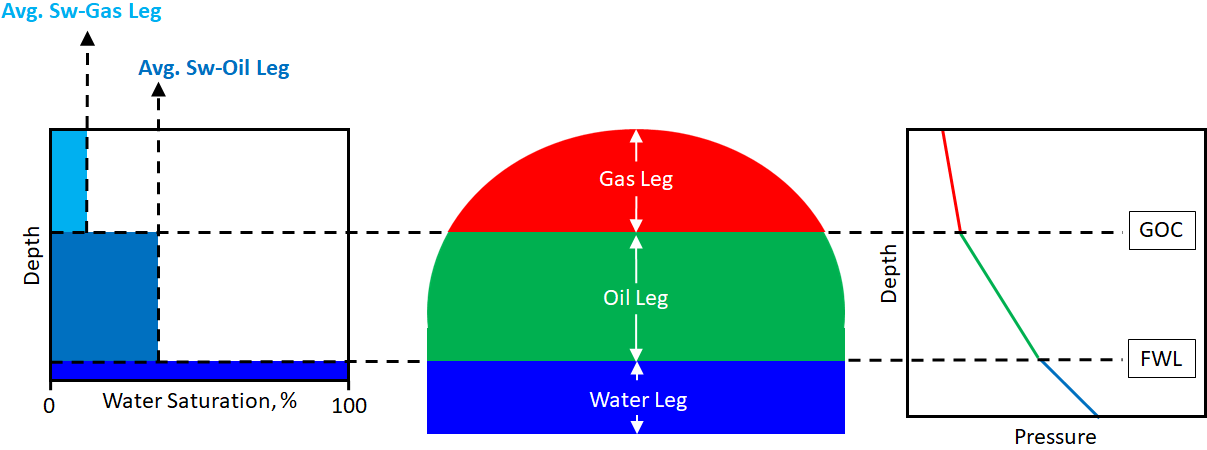
An example for defining saturations as 'Constants' - A simplified initial saturation distribution, and pressure profile of a reservoir (gas-oil-water system). Average water saturation (Sw) values are defined for gas leg and oil leg. Gas leg and oil leg are defined by the fluid levels (FWL and GOC) input into the fluid model. click to enlarge
- On the Saturation Functions form, select the saturation function model from the Function model drop-down list.
- Select Constants from the Methods drop-down list.
- Enter values for Sw - Oil Leg (i.e. the average Sw in the oil leg) and Sw - Gas Leg (i.e. the average Sw in the gas leg) for each nested class.
Uncertainty The constant water saturation values can be propagated as parametric uncertainties in a probabilistic volumetric calculation with the study strip. After you enter the Sw values for both the Oil leg and Gas leg of the nested classes and click Apply, the frog legs
 are activated. Click the uncertainty symbols next to the entry fields to open the Uncertainty Parameter dialog. For how to use the controls on the dialog, see The Uncertainty Parameter dialog. For information about parametric uncertainties and how to use them in JewelSuite Subsurface Modeling, see Incorporating uncertainty in static or dynamic modeling.
- Click Apply to assign the constant saturation values and keep the form open, or click OK to assign the values and close the form.
To define saturations as 'Functions'
This method allows you to define saturation functions which are usually a result of the external petrophysical work. The saturation functions are usually the outcome of regressions that give the best fit and the minimum error between the modeled Sw and the observed Sw (i.e. from well log interpretation or from core analysis).
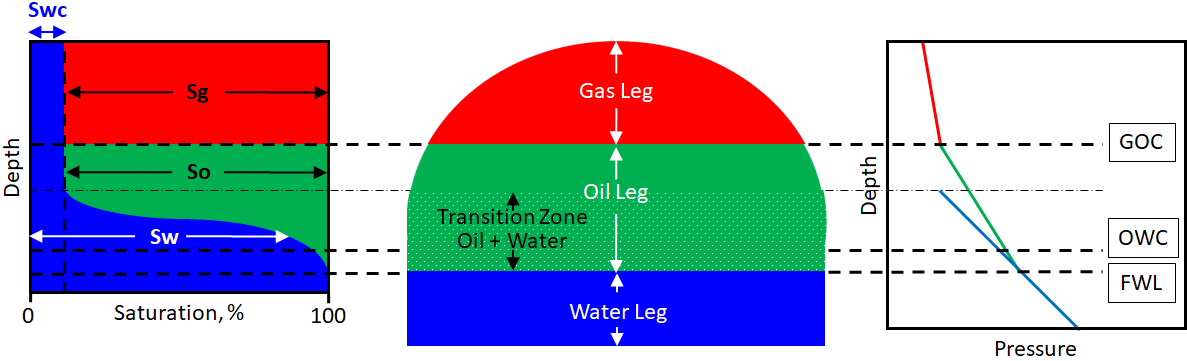
An example for defining saturations as 'Functions' - An idealized initial saturation distribution, and pressure profile of a reservoir (gas-oil-water system). In the oil-water transition zone, the water saturation (Sw) is gradually changing from 100% to connate water saturation (Swc). click to enlarge
- On the Saturation Functions form, select the saturation function model from the Function model drop-down list.
- Select Functions from the Methods drop-down list.
-
Select a Class from the list on the left of the form. The selected row is highlighted in blue.
If you want to set saturation values to undefined for a (facies) class, leave its expression blank by setting its Function Type to None. -
Function Type Select a saturation function type from the drop-down list. The options are - Brooks-Corey, Lambda, Leverett J, Thomeer, or Skelt-Harrison. If the saturation model has been assigned a fluid model with Paleo FWL, the options for function type are updated to - Brooks Corey + Land, or Brooks Corey + Skjaeveland.
If you have not assigned a Porosity log or a Permeability log in the previous Rock Properties step, you cannot use these properties in the expressions you will define (via the Variable selection in the Nested Functions). If you have assigned logs, you must use them in at least one of the expressions. Otherwise, you will receive an error message as a pop-up window when you click Apply or OK.Expression (read-only) For the selected function type, the correlation(s) is displayed in the expression area.
Nested Expressions Displays the parameters included in the main expression. They can be expressed as functions of Porosity, or Permeability, or √(Porosity/Permeability) by using the Nested functions table below.
The gravitational constant 'g' used in the expressions is 9.81 m/s2. - Pc Max For each (facies) class, enter a maximum capillary pressure value in the adjacent box. Pc Max value is required to calculate the connate water saturation which is a minimum water saturation value that confines the saturation height function. Click on the icon
 to open the dialog where you can Calculate the implied column height above FWL for each fluid compartment associated with the fluid model. The column height is based on the entered maximum capillary pressure value and the fluid properties of the compartment.
 -
Nested Functions Define the mathematical relationship between the parameter and the property in the nested expression, by specifying the following:
- Trend (i.e. exponential, linear, logarithmic, power, custom)
- Variable (i.e. Porosity, or Permeability, or √(Porosity/Permeability)) This option is not active when the Trend is set to Average.
- Coefficients (i.e. C1, C2)
Uncertainty The coefficients C1 and C2 can be propagated as parametric uncertainties in a probabilistic volumetric calculation with the study strip. Click the uncertainty symbols next to the C1 and C2 entry fields to open the Uncertainty Parameter dialog. For how to use the controls on the dialog, see The Uncertainty Parameter dialog. For information about parametric uncertainties and how to use them in JewelSuite Subsurface Modeling, see Incorporating uncertainty in static or dynamic modeling.
seven mathematical expressions, along with a custom functionThe Trends column contains seven mathematical expressions, along with a custom function, to be used to define the nested expressions in the saturation function:
Average C1Exponential10 pow (10, C1 + C2 * Variable)Exponentiale exp (C1 + C2 * Variable)Linear C1 + C2 * VariableLogarithmic10 C1 + C2 * log10 (Variable)Logarithmice C1 + C2 * ln (Variable)Power C1 + pow (Variable, C2)Custom Instead of using the predefined trends listed above, you also have the option of introducing a customized function. To do this, follow the steps below:
- In the Nested functions table, in the Trend column, select Custom from the drop-down list. This will activate the custom expression icon
 in the Custom column.
 - Click on the active custom expression icon
 to open the Custom Expression form.
 - For the explanation of further steps, see Customizing saturation functions.
- Coefficients The coefficients section is active only if you are creating a saturation function which has a fluid model assigned with Paleo FWL. Depending on the selected function type, there are three coefficients:
- Land constant (Brooks Corey + Land/Skjaeveland) Enter a value in the second column. Resulting residual fraction value (read-only) is shown in the third column.
- Wetting ratio (Brooks Corey + Skjaeveland) Enter a value in the second column for wetting ratio.
- AwAo ratio (Brooks Corey + Skjaeveland) Enter a value in the second column for aw/ao ratio.
Uncertainty The coefficients can be propagated as parametric uncertainties in a probabilistic volumetric calculation with the study strip. Click the uncertainty symbols next to the entry fields to open the Uncertainty Parameter dialog. For how to use the controls on the dialog, see The Uncertainty Parameter dialog. For information about parametric uncertainties and how to use them in JewelSuite Subsurface Modeling, see Incorporating uncertainty in static or dynamic modeling.
- If you have more than one (facies) class, select each (facies) class in turn and repeat step 5 until you have defined a function for each (facies) class.
- Click Apply to save your saturation function model and keep the form open, or click OK to save your model and close the form.
Preserving inputs of the saturation functions
The saturation function is linked to the fluid model that you define in the Fluid Modeling workflow. You can update or modify the fluid model, defined with or without a Paleo FWL, by adding or removing the FWL’s on the Fluid Levels form, and preserve the inputs on the saturation functions form. The input preservation is applicable for the Pc Max values and nested function expressions defined in the Brooks-Corey function and the modified functions (Land and Skjaeveland) used for modeling the Paleo FWL. In all cases, the initially defined Pc Max values for the fluid compartments are preserved. In case there are multiple rock facies, the inputs for each saturation function are preserved exclusively for those specific rock facies.
If you change the saturation function and then also change the common inputs from the initially defined function, these inputs are then preserved in case you want to revert back to the initially defined function. Note that in order to incorporate any changes on the form, you must Apply the modifications made on the form.
Data preservation behavior
The following table describes the input data, including the related nested functions and variables, which is preserved while modeling saturation functions in combination of a fluid model with or without Paleo FWL.
| Initial conditions | Data preserved after modifying fluid model and saturation model | ||||
|---|---|---|---|---|---|
| Fluid Model | Saturation model | No Paleo FWL | Paleo FWL | ||
| Brooks-Corey | Other functions | Brooks-Corey & Land | Brooks-Corey & Skjaeveland | ||
| No Paleo FWL | Brooks-Corey | Not applicable |
|
|
|
| Other functions (Leverett J, Thomeer and Lambda functions) |
|
Not applicable |
|
|
|
| Paleo FWL | Brooks-Corey & Land |
|
|
Not applicable |
|
| Brooks-Corey & Skjaeveland |
|
|
|
Not applicable | |
- Initial fluid model consists of a paleo FWL along with Land or Skjaeveland saturation function.
- Change your fluid model to a ‘no paleo’ FWL with another saturation function.
- Restoring to your initial paleo fluid model and saturation function definition will restore your initial inputs for all the facies types on the saturation functions form.
Effects on uncertainty parameter definitions
The nested functions, variables and coefficients in your saturation function along with the assigned fluid model may consist of uncertainty parameters that are used in the Volumetrics Study workflow. Modifying your initially defined saturation functions and the fluid model preserves the uncertainty definition for the parameters, and also updates the listed parameters on the Designs form in the Volumetrics Study workflow.
An existing uncertainty parameter definition is also preserved if you are reverting back to the initially defined saturation function or a fluid model. Note that you must re-select the uncertainty parameter on the Designs form and Apply the changes before running the study.